Exploring measurements from fews
In this notebook, you will experiment how to use the hydropandas package to access, visualize and explore meta data from the FEWS database. More information on FEWS can be found on their website.
Notebook contents
FEWS xml files
Directory with xml files
Connect to a FEWS database
[39]:
import os

import matplotlib.pyplot as plt
import requests

import hydropandas as hpd
[2]:
hpd.util.get_color_logger("INFO")
[2]:
<RootLogger root (INFO)>
FEWS xml files
You can read FEWS xml files using the code below. First we download the xml files and put them in the ‘fewsdata’ directory.
[42]:
# download test file
if not os.path.exists("./fewsdata"):
    os.mkdir("./fewsdata")
xml_file_url = "https://raw.githubusercontent.com/ArtesiaWater/hydropandas/refs/heads/master/tests/data/2019-FEWS-test/test_wsvv_fews.xml"
r = requests.get(xml_file_url)
with open("./fewsdata/test_wsvv_fews.xml", "w+") as f:
    f.write(r.text)
The file ‘test_wsvv_fews.xml’ contains data from a radar. We can read the data in this file using the read_fews function.
Note: The read_fews function will always return a collection of observations (ObsCollection) because a single xml file can have multiple observations.
[59]:
# read a single xml file
fname = "./fewsdata/test_wsvv_fews.xml"
oc = hpd.read_fews(fname, ObsClass=hpd.MeteoObs)
oc
INFO:hydropandas.io.fews:1/1 read test_wsvv_fews.xml
INFO:hydropandas.io.fews:reading FEWS_RADAR_241
INFO:hydropandas.io.fews:reading FEWS_RADAR_241
[59]:
| x | y | filename | source | unit | station | meteo_var | obs | |
|---|---|---|---|---|---|---|---|---|
| name | ||||||||
| FEWS_RADAR_241_P.radar.h | 161278.0 | 454989.0 | FEWS | mm | NaN | P.radar.h | MeteoObs FEWS_RADAR_241_P.radar.h -----metadat... | |
| FEWS_RADAR_241_Eact.d | 161278.0 | 454989.0 | FEWS | mm | NaN | Eact.d | MeteoObs FEWS_RADAR_241_Eact.d -----metadata--... |
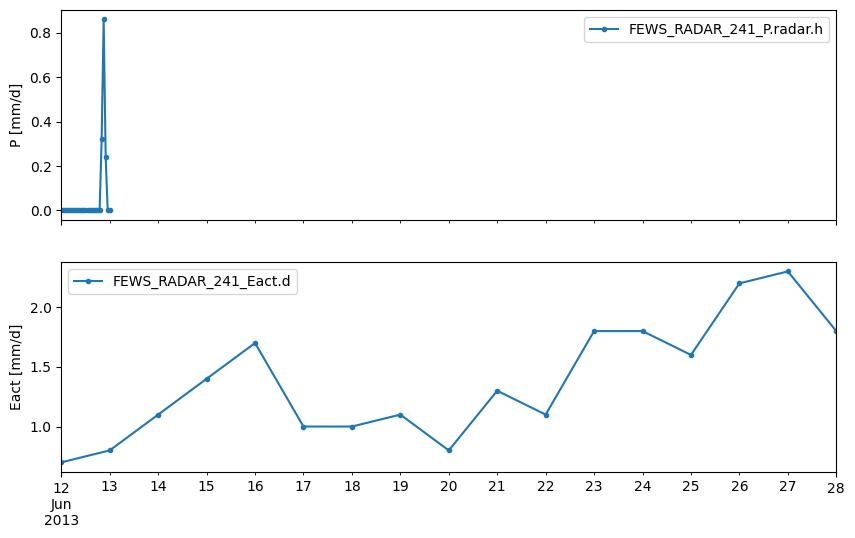
Now we can visualise the data like we any ObsCollection.
[60]:
# plot the measurements
f, axes = plt.subplots(2, 1, figsize=(10, 6), sharex=True)
oc.get_obs("FEWS_RADAR_241_P.radar.h")["value"].plot(
    ax=axes[0], marker=".", legend=True, ylabel="P [mm/d]"
)
oc.get_obs("FEWS_RADAR_241_Eact.d")["value"].plot(
    ax=axes[1], marker=".", legend=True, ylabel="Eact [mm/d]"
)
[60]:
<Axes: ylabel='Eact [mm/d]'>
Directory with xml files
We can also read a whole zipfile with xml files at once.
[61]:
# download zip directory
zip_file_url = "https://github.com/ArtesiaWater/hydropandas/raw/refs/heads/master/tests/data/2019-FEWS-test/WaalenBurg_201810-20190215_prod.zip"
r = requests.get(zip_file_url)
with open("./fewsdata/WaalenBurg_201810-20190215_prod.zip", "wb") as f:
    f.write(r.content)
[62]:
# read a zipfile
fdir = "./fewsdata/WaalenBurg_201810-20190215_prod.zip"
oc = hpd.read_fews(fdir)
oc
INFO:hydropandas.io.fews:1/1 read WaalenBurg_201810-20190215_prod.xml
INFO:hydropandas.io.fews:reading MPN-N-1
INFO:hydropandas.io.fews:reading MPN-N-2
[62]:
| x | y | filename | source | unit | monitoring_well | tube_nr | screen_top | screen_bottom | ground_level | tube_top | metadata_available | obs | |
|---|---|---|---|---|---|---|---|---|---|---|---|---|---|
| name | |||||||||||||
| MPN-N-1_H.meting | 115535.9882 | 567867.7001 | FEWS | mNAP | MPN-N-1 | NaN | NaN | NaN | NaN | True | GroundwaterObs MPN-N-1_H.meting -----metadata-... | ||
| MPN-N-2_H.meting | 115294.9832 | 567758.8142 | FEWS | mNAP | MPN-N-2 | NaN | NaN | NaN | NaN | True | GroundwaterObs MPN-N-2_H.meting -----metadata-... |
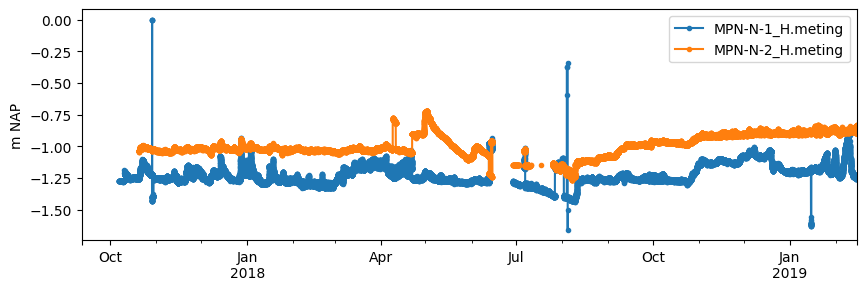
[63]:
# plot the measurements
f, ax = plt.subplots(figsize=(10, 3))
oc.get_obs("MPN-N-1_H.meting")["value"].plot(
    ax=ax, marker=".", legend=True, ylabel="m NAP"
)
oc.get_obs("MPN-N-2_H.meting")["value"].plot(
    ax=ax, marker=".", legend=True, ylabel="m NAP"
)
[63]:
<Axes: ylabel='m NAP'>
Connect to a FEWS database
It is also possible to connect to a FEWS database and obtain the data directly without having to make a file dump. For this you need to have:
Access to the database
An endpoint (url) for the database
A location ID from a measurement point in the database
If you have these you can set the variables below and obtain the measurements.
[ ]:
# put here the URL of your fews database
fews_db_url = ""  # enter fews database url here
location_id = ""  # enter location id here

# read as observation objects
params = {
    "locationIds": location_id,
    "documentVersion": "1.26",
    "documentFormat": "PI_XML",
}

r = requests.get(fews_db_url, params=params, verify=True)
xmlstring = r.text

oc = hpd.ObsCollection.from_fews_xml(
    xmlstring=xmlstring,
    ObsClass=hpd.Obs,
    low_memory=False,
)

oc