Merging observations
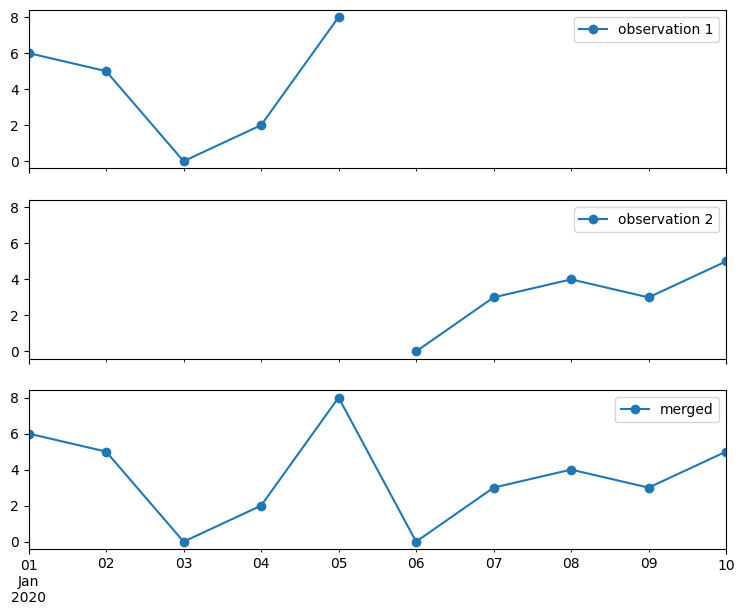
This notebook shows how observations and observation collections can be merged. Merging observations can be useful if:
you have data from multiple sources measuring at the same location
you get new measurements that you want to add to the old measurements.
Notebook contents
[1]:
import matplotlib.pyplot as plt
import numpy as np
import pandas as pd
from IPython.display import display

import hydropandas as hpd

hpd.util.get_color_logger("INFO");
Simple merge
[2]:
# observation 1
df = pd.DataFrame(
    {"measurements": np.random.randint(0, 10, 5)},
    index=pd.date_range("2020-1-1", "2020-1-5"),
)
o1 = hpd.Obs(df, name="obs", x=0, y=0)
display(o1)
hydropandas.Obs
| obs | |
|---|---|
| x | 0 |
| y | 0 |
| location | |
| filename | |
| source | |
| unit |
| measurements | |
|---|---|
| 2020-01-01 | 6 |
| 2020-01-02 | 5 |
| 2020-01-03 | 0 |
| 2020-01-04 | 2 |
| 2020-01-05 | 8 |
[3]:
# observation 2
df = pd.DataFrame(
    {"measurements": np.random.randint(0, 10, 5)},
    index=pd.date_range("2020-1-6", "2020-1-10"),
)
o2 = hpd.Obs(df, name="obs", x=0, y=0)
display(o2)
hydropandas.Obs
| obs | |
|---|---|
| x | 0 |
| y | 0 |
| location | |
| filename | |
| source | |
| unit |
| measurements | |
|---|---|
| 2020-01-06 | 0 |
| 2020-01-07 | 3 |
| 2020-01-08 | 4 |
| 2020-01-09 | 3 |
| 2020-01-10 | 5 |
[4]:
o_merged = o1.merge_observation(o2)
o_merged
INFO:hydropandas.observation._merge_timeseries:right observation has a different time series
INFO:hydropandas.observation._merge_timeseries:merge time series
INFO:hydropandas.observation.merge_metadata:left and right observation have the same metadata
[4]:
hydropandas.Obs
| obs | |
|---|---|
| x | 0 |
| y | 0 |
| location | |
| filename | |
| source | |
| unit |
| measurements | |
|---|---|
| 2020-01-01 | 6 |
| 2020-01-02 | 5 |
| 2020-01-03 | 0 |
| 2020-01-04 | 2 |
| 2020-01-05 | 8 |
| 2020-01-06 | 0 |
| 2020-01-07 | 3 |
| 2020-01-08 | 4 |
| 2020-01-09 | 3 |
| 2020-01-10 | 5 |
[5]:
f, axes = plt.subplots(figsize=(9, 7), nrows=3, sharex=True, sharey=True)
o1["measurements"].plot(ax=axes[0], marker="o", label="observation 1").legend(loc=1)
o2["measurements"].plot(ax=axes[1], marker="o", label="observation 2").legend(loc=1)
o_merged["measurements"].plot(ax=axes[2], marker="o", label="merged").legend(loc=1)
[5]:
<matplotlib.legend.Legend at 0x710dbbdc2270>
Merge options
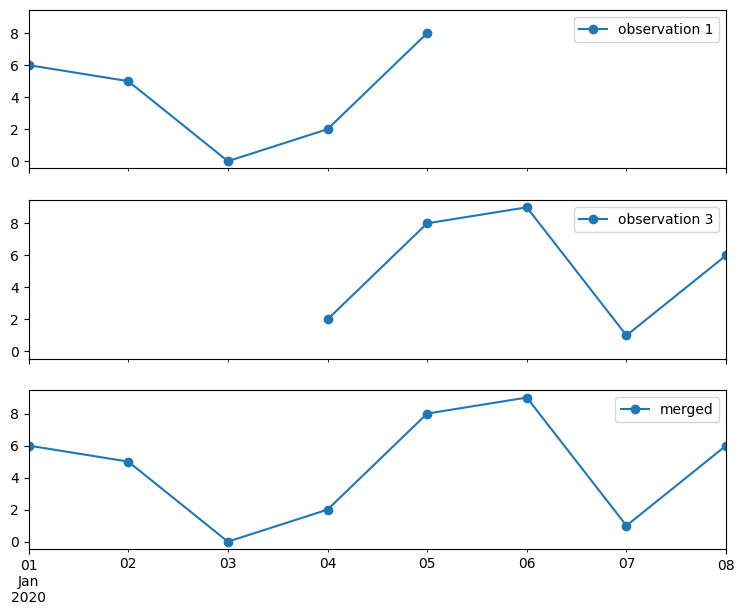
overlapping timeseries
[6]:
# create a partially overlapping dataframe
df = pd.DataFrame(
    {
        "measurements": np.concatenate(
            [o1["measurements"].values[-2:], np.random.randint(0, 10, 3)]
        )
    },
    index=pd.date_range("2020-1-4", "2020-1-8"),
)
o3 = hpd.Obs(df, name="obs", x=0, y=0)
display(o3)
hydropandas.Obs
| obs | |
|---|---|
| x | 0 |
| y | 0 |
| location | |
| filename | |
| source | |
| unit |
| measurements | |
|---|---|
| 2020-01-04 | 2 |
| 2020-01-05 | 8 |
| 2020-01-06 | 9 |
| 2020-01-07 | 1 |
| 2020-01-08 | 6 |
[7]:
o_merged = o1.merge_observation(o3)
INFO:hydropandas.observation._merge_timeseries:right observation has a different time series
INFO:hydropandas.observation._merge_timeseries:merge time series
INFO:hydropandas.observation.merge_metadata:left and right observation have the same metadata
[8]:
f, axes = plt.subplots(figsize=(9, 7), nrows=3, sharex=True, sharey=True)
o1["measurements"].plot(ax=axes[0], marker="o", label="observation 1").legend(loc=1)
o3["measurements"].plot(ax=axes[1], marker="o", label="observation 3").legend(loc=1)
o_merged["measurements"].plot(ax=axes[2], marker="o", label="merged").legend(loc=1)
[8]:
<matplotlib.legend.Legend at 0x710dbbcdce30>
[9]:
# create a partially overlapping dataframe with different values
df = pd.DataFrame(
    {"measurements": np.random.randint(0, 10, 5)},
    index=pd.date_range("2020-1-4", "2020-1-8"),
)
o4 = hpd.Obs(df, name="obs", x=0, y=0)
display(o4)
hydropandas.Obs
| obs | |
|---|---|
| x | 0 |
| y | 0 |
| location | |
| filename | |
| source | |
| unit |
| measurements | |
|---|---|
| 2020-01-04 | 0 |
| 2020-01-05 | 4 |
| 2020-01-06 | 5 |
| 2020-01-07 | 9 |
| 2020-01-08 | 1 |
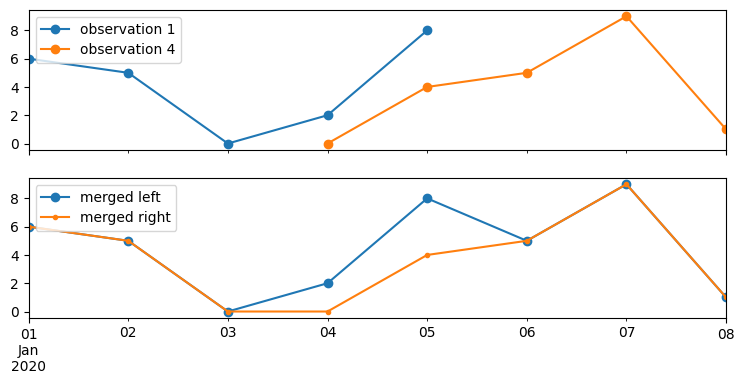
by default an error is raised if the overlapping time series have different values
[10]:
o1.merge_observation(o4)
INFO:hydropandas.observation._merge_timeseries:right observation has a different time series
INFO:hydropandas.observation._merge_timeseries:merge time series
WARNING:hydropandas.observation._merge_timeseries:timeseries of observation obs overlap with different values
---------------------------------------------------------------------------
ValueError                                Traceback (most recent call last)
Cell In[10], line 1
----> 1 o1.merge_observation(o4)

File ~/checkouts/readthedocs.org/user_builds/hydropandas/envs/latest/lib/python3.12/site-packages/hydropandas/observation.py:682, in Obs.merge_observation(self, right, overlap, merge_metadata)
    676     raise TypeError(
    677         f"observation left has a different type {type(self)} than"
    678         f"observation right {type(right)}"
    679     )
    681 # merge timeseries
--> 682 o = self._merge_timeseries(right, overlap=overlap)
    684 # merge metadata
    685 if merge_metadata:

File ~/checkouts/readthedocs.org/user_builds/hydropandas/envs/latest/lib/python3.12/site-packages/hydropandas/observation.py:595, in Obs._merge_timeseries(self, right, overlap)
    590 logger.warning(
    591     f"timeseries of observation {right.name} overlap with "
    592     "different values"
    593 )
    594 if overlap == "error":
--> 595     raise ValueError(
    596         "observations have different values for same time steps"
    597     )
    598 elif overlap == "use_left":
    599     dup_o = self.loc[dup_ind_o.index, overlap_cols]

ValueError: observations have different values for same time steps
With the ‘overlap’ argument you can specify to use the left or the right observation when merging. See example below.
[11]:
print("use left")
merged_left = o1.merge_observation(o4, overlap="use_left")
display(merged_left)  # use the existing observation
print("use right")
merged_right = o1.merge_observation(o4, overlap="use_right")
display(merged_right)  # use the existing observation
use left
INFO:hydropandas.observation._merge_timeseries:right observation has a different time series
INFO:hydropandas.observation._merge_timeseries:merge time series
WARNING:hydropandas.observation._merge_timeseries:timeseries of observation obs overlap with different values
INFO:hydropandas.observation.merge_metadata:left and right observation have the same metadata
hydropandas.Obs
| obs | |
|---|---|
| x | 0 |
| y | 0 |
| location | |
| filename | |
| source | |
| unit |
| measurements | |
|---|---|
| 2020-01-01 | 6 |
| 2020-01-02 | 5 |
| 2020-01-03 | 0 |
| 2020-01-04 | 2 |
| 2020-01-05 | 8 |
| 2020-01-06 | 5 |
| 2020-01-07 | 9 |
| 2020-01-08 | 1 |
use right
INFO:hydropandas.observation._merge_timeseries:right observation has a different time series
INFO:hydropandas.observation._merge_timeseries:merge time series
WARNING:hydropandas.observation._merge_timeseries:timeseries of observation obs overlap with different values
INFO:hydropandas.observation.merge_metadata:left and right observation have the same metadata
hydropandas.Obs
| obs | |
|---|---|
| x | 0 |
| y | 0 |
| location | |
| filename | |
| source | |
| unit |
| measurements | |
|---|---|
| 2020-01-01 | 6 |
| 2020-01-02 | 5 |
| 2020-01-03 | 0 |
| 2020-01-04 | 0 |
| 2020-01-05 | 4 |
| 2020-01-06 | 5 |
| 2020-01-07 | 9 |
| 2020-01-08 | 1 |
[12]:
f, axes = plt.subplots(figsize=(9, 4), nrows=2, sharex=True, sharey=True)
o1["measurements"].plot(ax=axes[0], marker="o", label="observation 1").legend(loc=2)
o4["measurements"].plot(ax=axes[0], marker="o", label="observation 4").legend(loc=2)
merged_left["measurements"].plot(ax=axes[1], marker="o", label="merged left").legend(
    loc=2
)
merged_right["measurements"].plot(ax=axes[1], marker=".", label="merged right").legend(
    loc=2
)
[12]:
<matplotlib.legend.Legend at 0x710dbb93c0b0>
metadata
The merge_observation method checks by default if the metadata of the two observations is the same.
[13]:
# observation 2
df = pd.DataFrame(
    {"measurements": np.random.randint(0, 10, 5)},
    index=pd.date_range("2020-1-6", "2020-1-10"),
)
o5 = hpd.Obs(df, name="obs5", x=0, y=0)
o5
[13]:
hydropandas.Obs
| obs5 | |
|---|---|
| x | 0 |
| y | 0 |
| location | |
| filename | |
| source | |
| unit |
| measurements | |
|---|---|
| 2020-01-06 | 2 |
| 2020-01-07 | 7 |
| 2020-01-08 | 3 |
| 2020-01-09 | 2 |
| 2020-01-10 | 6 |
When the metadata differs a ValueError is raised.
[14]:
o1.merge_observation(o5)
INFO:hydropandas.observation._merge_timeseries:right observation has a different time series
INFO:hydropandas.observation._merge_timeseries:merge time series
---------------------------------------------------------------------------
ValueError                                Traceback (most recent call last)
Cell In[14], line 1
----> 1 o1.merge_observation(o5)

File ~/checkouts/readthedocs.org/user_builds/hydropandas/envs/latest/lib/python3.12/site-packages/hydropandas/observation.py:687, in Obs.merge_observation(self, right, overlap, merge_metadata)
    685 if merge_metadata:
    686     metadata = {key: getattr(right, key) for key in right._get_meta_attr()}
--> 687     new_metadata = self.merge_metadata(metadata, overlap=overlap)
    688 else:
    689     new_metadata = {key: getattr(self, key) for key in self._get_meta_attr()}

File ~/checkouts/readthedocs.org/user_builds/hydropandas/envs/latest/lib/python3.12/site-packages/hydropandas/observation.py:505, in Obs.merge_metadata(self, right, overlap)
    503 same_metadata = False
    504 if overlap == "error":
--> 505     raise ValueError(
    506         f"left observation {key} differs from right observation"
    507     )
    508 elif overlap == "use_left":
    509     logger.info(
    510         f"left observation {key} differs from right "
    511         "observation, use left"
    512     )

ValueError: left observation name differs from right observation
If you set the merge_metadata argument to False the metadata is not merged and only the timeseries of the observations is merged.
[15]:
o1.merge_observation(o5, merge_metadata=False)
INFO:hydropandas.observation._merge_timeseries:right observation has a different time series
INFO:hydropandas.observation._merge_timeseries:merge time series
[15]:
hydropandas.Obs
| obs | |
|---|---|
| x | 0 |
| y | 0 |
| location | |
| filename | |
| source | |
| unit |
| measurements | |
|---|---|
| 2020-01-01 | 6 |
| 2020-01-02 | 5 |
| 2020-01-03 | 0 |
| 2020-01-04 | 2 |
| 2020-01-05 | 8 |
| 2020-01-06 | 2 |
| 2020-01-07 | 7 |
| 2020-01-08 | 3 |
| 2020-01-09 | 2 |
| 2020-01-10 | 6 |
Just as with overlapping timeseries, the ‘overlap’ argument can also be used for overlapping metadata values
[16]:
o_merged = o1.merge_observation(o5, overlap="use_left", merge_metadata=True)
print('observation name when overlap="use_left":', o_merged.name)
o_merged = o1.merge_observation(o5, overlap="use_right", merge_metadata=True)
print('observation name when overlap="use_right":', o_merged.name)
INFO:hydropandas.observation._merge_timeseries:right observation has a different time series
INFO:hydropandas.observation._merge_timeseries:merge time series
INFO:hydropandas.observation.merge_metadata:left observation name differs from right observation, use left
observation name when overlap="use_left": obs
INFO:hydropandas.observation._merge_timeseries:right observation has a different time series
INFO:hydropandas.observation._merge_timeseries:merge time series
INFO:hydropandas.observation.merge_metadata:left observation name differs from right observation, use right
observation name when overlap="use_right": obs5
all combinations
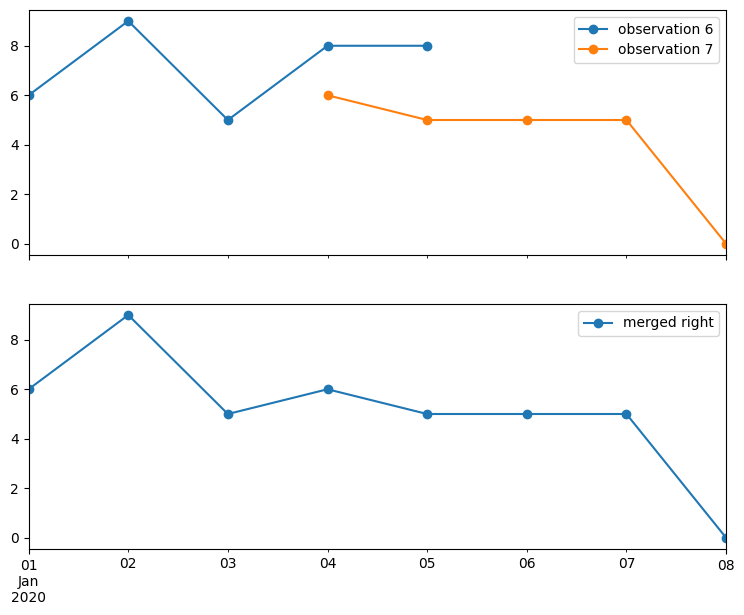
Combine two observations with: - different columns - overlapping columns - overlapping time series - different metadata
[17]:
# observation 6
df = pd.DataFrame(
    {"measurements": np.random.randint(0, 10, 5), "filter": np.ones(5)},
    index=pd.date_range("2020-1-1", "2020-1-5"),
)
o6 = hpd.Obs(df, name="obs6", x=100, y=0)
o6
[17]:
hydropandas.Obs
| obs6 | |
|---|---|
| x | 100 |
| y | 0 |
| location | |
| filename | |
| source | |
| unit |
| measurements | filter | |
|---|---|---|
| 2020-01-01 | 6 | 1.0 |
| 2020-01-02 | 9 | 1.0 |
| 2020-01-03 | 5 | 1.0 |
| 2020-01-04 | 8 | 1.0 |
| 2020-01-05 | 8 | 1.0 |
[18]:
# observation 7
df = pd.DataFrame(
    {
        "measurements": np.concatenate(
            [o5["measurements"].values[-1:], np.random.randint(0, 10, 4)]
        ),
        "remarks": ["", "", "", "unreliable", ""],
    },
    index=pd.date_range("2020-1-4", "2020-1-8"),
)
o7 = hpd.Obs(df, name="obs7", x=0, y=100)
o7
[18]:
hydropandas.Obs
| obs7 | |
|---|---|
| x | 0 |
| y | 100 |
| location | |
| filename | |
| source | |
| unit |
| measurements | remarks | |
|---|---|---|
| 2020-01-04 | 6 | |
| 2020-01-05 | 5 | |
| 2020-01-06 | 5 | |
| 2020-01-07 | 5 | unreliable |
| 2020-01-08 | 0 |
[19]:
merged_right = o6.merge_observation(o7, overlap="use_right")
merged_right
INFO:hydropandas.observation._merge_timeseries:right observation has a different time series
INFO:hydropandas.observation._merge_timeseries:merge time series
WARNING:hydropandas.observation._merge_timeseries:timeseries of observation obs7 overlap with different values
INFO:hydropandas.observation.merge_metadata:left observation name differs from right observation, use right
INFO:hydropandas.observation.merge_metadata:left observation x differs from right observation, use right
INFO:hydropandas.observation.merge_metadata:left observation y differs from right observation, use right
[19]:
hydropandas.Obs
| obs7 | |
|---|---|
| x | 0 |
| y | 100 |
| location | |
| filename | |
| source | |
| unit |
| measurements | remarks | filter | |
|---|---|---|---|
| 2020-01-01 | 6 | NaN | 1.0 |
| 2020-01-02 | 9 | NaN | 1.0 |
| 2020-01-03 | 5 | NaN | 1.0 |
| 2020-01-04 | 6 | 1.0 | |
| 2020-01-05 | 5 | 1.0 | |
| 2020-01-06 | 5 | NaN | |
| 2020-01-07 | 5 | unreliable | NaN |
| 2020-01-08 | 0 | NaN |
[20]:
f, axes = plt.subplots(figsize=(9, 7), nrows=2, sharex=True, sharey=True)
o6["measurements"].plot(ax=axes[0], marker="o", label="observation 6").legend(loc=2)
o7["measurements"].plot(ax=axes[0], marker="o", legend=True, label="observation 7")
merged_right["measurements"].plot(
    ax=axes[1], marker="o", legend=True, label="merged right"
)
[20]:
<Axes: >
Merge observation collections
[21]:
# create an observation collection from a single observation
oc1 = hpd.ObsCollection(o1)
We can add a single observation to this collection using the add_observation method.
[22]:
oc1.add_observation(o7)
INFO:hydropandas.obs_collection.add_observation:adding obs7 to collection
[22]:
| x | y | location | filename | source | unit | obs | |
|---|---|---|---|---|---|---|---|
| name | |||||||
| obs | 0 | 0 | Obs obs -----metadata------ name : obs x : 0 ... | ||||
| obs7 | 0 | 100 | Obs obs7 -----metadata------ name : obs7 x : ... |
We can also combine two observation collections.
[23]:
# create another observation collection from a list of observations
oc2 = hpd.ObsCollection([o5, o6])

# add the collection to the previous one
oc1.add_obs_collection(oc2)
INFO:hydropandas.obs_collection.add_observation:adding obs5 to collection
INFO:hydropandas.obs_collection.add_observation:adding obs6 to collection
[23]:
| x | y | location | filename | source | unit | obs | |
|---|---|---|---|---|---|---|---|
| name | |||||||
| obs | 0 | 0 | Obs obs -----metadata------ name : obs x : 0 ... | ||||
| obs5 | 0 | 0 | Obs obs5 -----metadata------ name : obs5 x : ... | ||||
| obs6 | 100 | 0 | Obs obs6 -----metadata------ name : obs6 x : ... |
There is an automatic check for overlap based on the name of the observations. If the observations in both collections are exactly the same they are merged.
[24]:
# add o2 to the observation collection 1
oc1.add_observation(o2)
INFO:hydropandas.obs_collection.add_observation:observation name obs already in collection, merging observations
INFO:hydropandas.observation._merge_timeseries:right observation has a different time series
INFO:hydropandas.observation._merge_timeseries:merge time series
INFO:hydropandas.observation.merge_metadata:left and right observation have the same metadata
[24]:
| x | y | location | filename | source | unit | obs | |
|---|---|---|---|---|---|---|---|
| name | |||||||
| obs | 0 | 0 | Obs obs -----metadata------ name : obs x : 0 ... |
If the observation you want to add has the same name but not the same timeseries an error is raised.
[25]:
o1_mod = o1.copy()
o1_mod.loc["2020-01-02", "measurements"] = 100
oc1.add_observation(o1_mod)
INFO:hydropandas.obs_collection.add_observation:observation name obs already in collection, merging observations
INFO:hydropandas.observation._merge_timeseries:right observation has a different time series
INFO:hydropandas.observation._merge_timeseries:merge time series
WARNING:hydropandas.observation._merge_timeseries:timeseries of observation obs overlap with different values
---------------------------------------------------------------------------
ValueError                                Traceback (most recent call last)
Cell In[25], line 3
      1 o1_mod = o1.copy()
      2 o1_mod.loc["2020-01-02", "measurements"] = 100
----> 3 oc1.add_observation(o1_mod)

File ~/checkouts/readthedocs.org/user_builds/hydropandas/envs/latest/lib/python3.12/site-packages/hydropandas/obs_collection.py:1546, in ObsCollection.add_observation(self, o, check_consistency, inplace, **kwargs)
   1541 logger.info(
   1542     f"observation name {o.name} already in collection, merging observations"
   1543 )
   1545 o1 = oc.loc[o.name, "obs"]
-> 1546 omerged = o1.merge_observation(o, **kwargs)
   1548 # overwrite observation in collection
   1549 oc.loc[o.name] = omerged.to_collection_dict()

File ~/checkouts/readthedocs.org/user_builds/hydropandas/envs/latest/lib/python3.12/site-packages/hydropandas/observation.py:682, in Obs.merge_observation(self, right, overlap, merge_metadata)
    676     raise TypeError(
    677         f"observation left has a different type {type(self)} than"
    678         f"observation right {type(right)}"
    679     )
    681 # merge timeseries
--> 682 o = self._merge_timeseries(right, overlap=overlap)
    684 # merge metadata
    685 if merge_metadata:

File ~/checkouts/readthedocs.org/user_builds/hydropandas/envs/latest/lib/python3.12/site-packages/hydropandas/observation.py:595, in Obs._merge_timeseries(self, right, overlap)
    590 logger.warning(
    591     f"timeseries of observation {right.name} overlap with "
    592     "different values"
    593 )
    594 if overlap == "error":
--> 595     raise ValueError(
    596         "observations have different values for same time steps"
    597     )
    598 elif overlap == "use_left":
    599     dup_o = self.loc[dup_ind_o.index, overlap_cols]

ValueError: observations have different values for same time steps
To avoid errors we can use the overlap arguments to specify which observation we want to use.
[26]:
oc1.add_observation(o1_mod, overlap="use_left")
INFO:hydropandas.obs_collection.add_observation:observation name obs already in collection, merging observations
INFO:hydropandas.observation._merge_timeseries:right observation has a different time series
INFO:hydropandas.observation._merge_timeseries:merge time series
WARNING:hydropandas.observation._merge_timeseries:timeseries of observation obs overlap with different values
INFO:hydropandas.observation.merge_metadata:left and right observation have the same metadata
[26]:
| x | y | location | filename | source | unit | obs | |
|---|---|---|---|---|---|---|---|
| name | |||||||
| obs | 0 | 0 | Obs obs -----metadata------ name : obs x : 0 ... |